PunanePastakas
An AI grading tool that helps STEM teachers grade handwritten work and send every student personal feedback.
- Type of work
- Design, Engineering
- Year
- 2026
- Platform
- Web
Since May 2026 we have taken it from a hackathon prototype to a pilot on 100 maths exams and a public beta used by 40 teachers. I led design and built the product with a small volunteer team.
40
Active teachers using the beta
1000+
Exercises graded

Context
Most of that time goes to repetitive checking: the same mistakes, the same comments, paper after paper. Students often get their work back days later with a score and little to learn from.
AI has become good and affordable at three things grading needs: reading handwriting, spotting gaps in reasoning, and drafting feedback. We set out to put those skills in a teacher’s hands without taking the judgement out of them.
Problem
Insight
The bottleneck is the teacher’s time per paper. A tool that reads, checks and drafts can give that time back, as long as the teacher stays in control of the grade.
378
Hours a teacher spends grading in a school year. Most of it is repetitive work they would gladly hand off.
Decisions
Every iteration went back to teachers before the next one started. Teachers shaped three of the eight steps between the first prototype and the beta.
AI drafts, the teacher decides
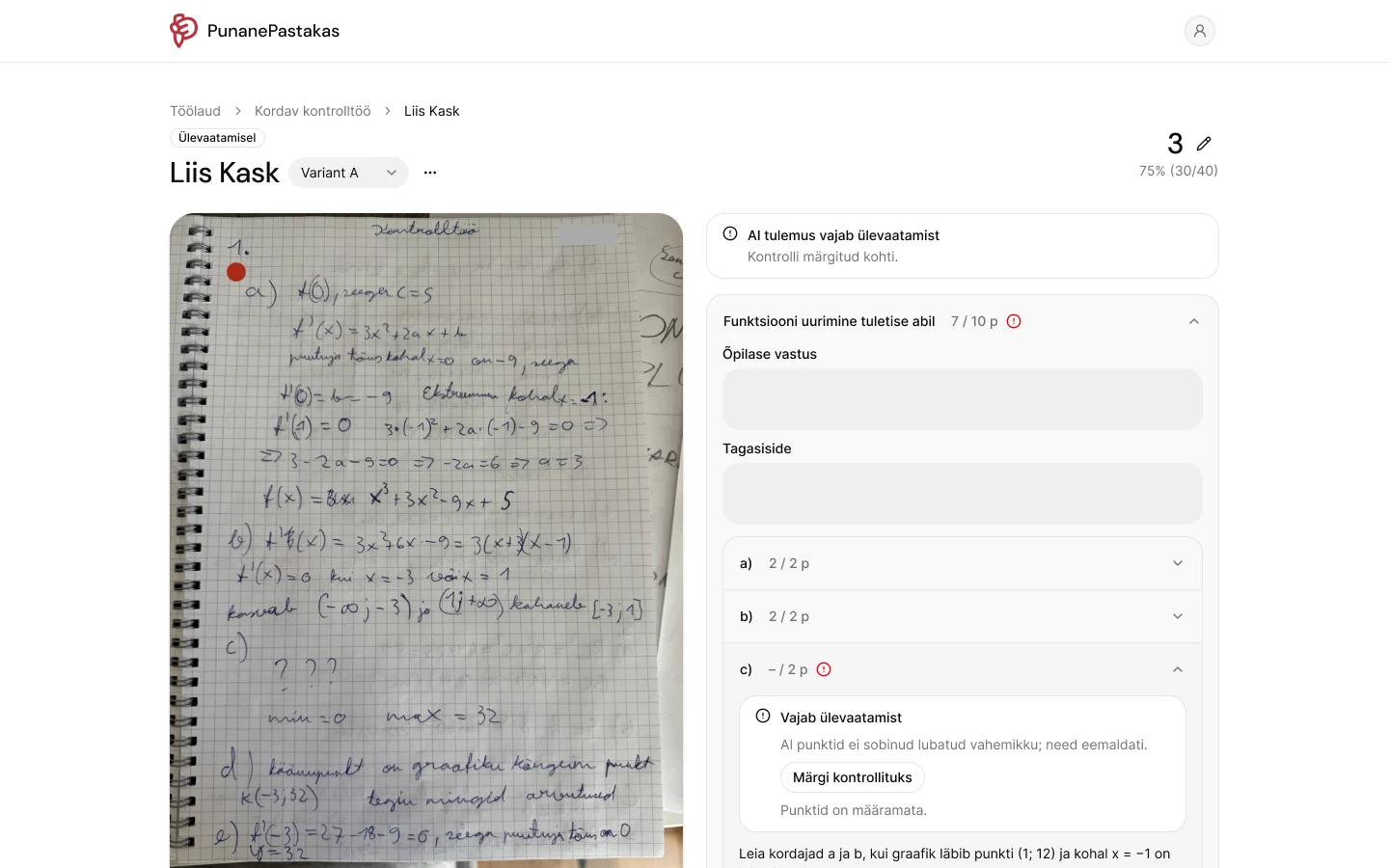
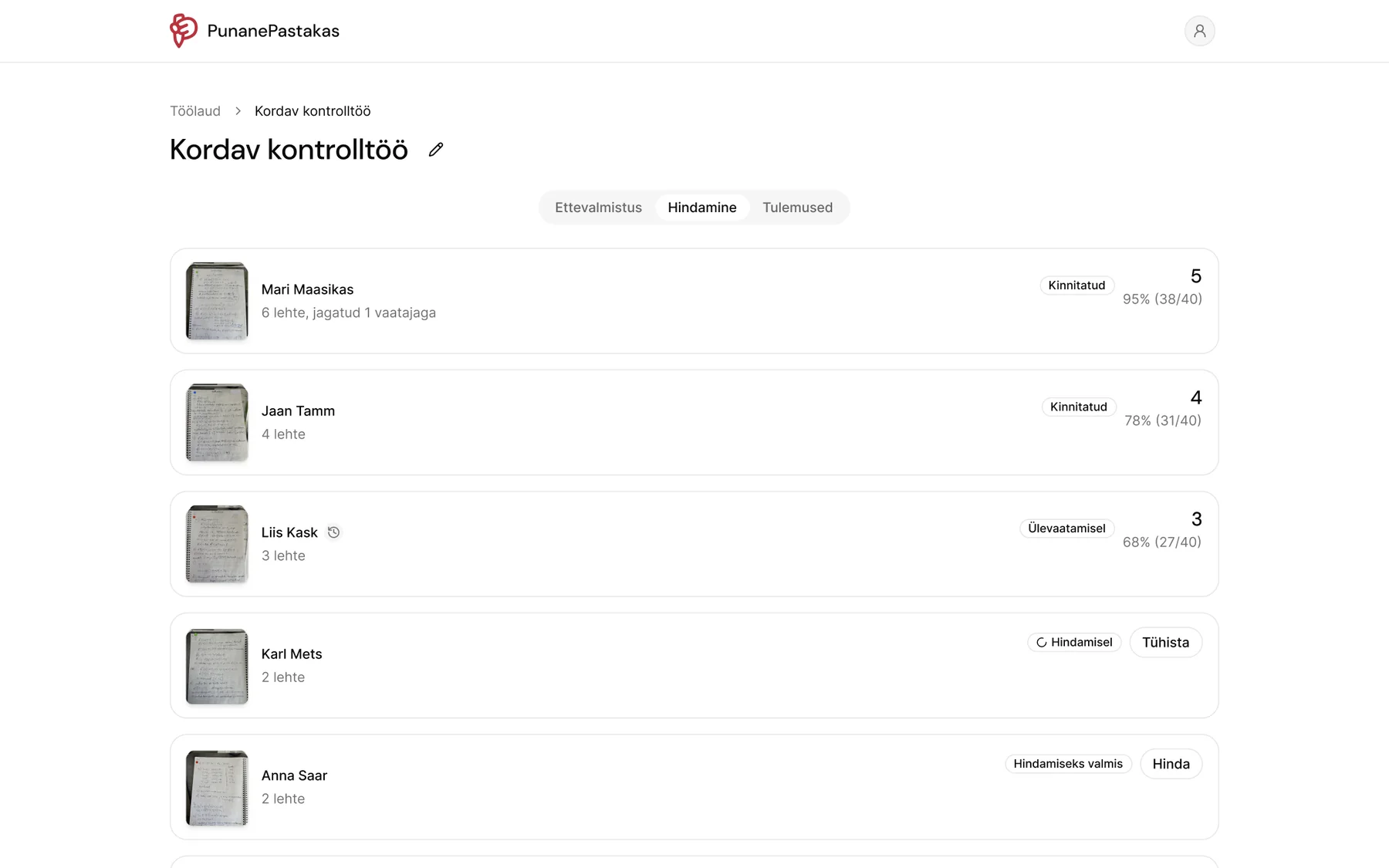
Nothing reaches a student until the teacher confirms it. The AI suggests a score and drafts feedback; the teacher edits or accepts with one click.
Separate misunderstandings from slips
The AI flags whether a wrong answer is a conceptual error or an accidental one, and marks its exact place on the page.
Grade the student, not the page
Students hand in several scans per assignment. We group them into one cluster per student, so the teacher reviews a whole answer at once.
Design
I mapped the user journeys in Miro, sketched the review screen on paper, then moved between code and Figma in alternating rounds. The final interface puts the student’s work in the centre and the AI’s suggestions to the side.
Impact
A pilot that matched teachers, and a beta they use
70%
AI–human score agreement on 100 maths exams
<3%
Variance in total scores between AI and teachers
40
Teachers using the beta since September 2026
80
Students receiving feedback through the app
“AI drafts. The teacher decides.”
[Teacher quote from the MURG pilot or beta, one or two sentences on time saved or feedback quality]
[Teacher quote from the MURG pilot or beta, one or two sentences on time saved or feedback quality]
Beyond the product, I presented the pilot results to Estonia’s Ministry of Education to make the case for AI grading in schools nationally.
Reflection
What I would carry forward
Putting each version in front of teachers early saved weeks. The hackathon prototype was rough, but it told us which features mattered before we designed any of them properly.
The clearest next step is task-based grading: reviewing one exercise across the whole class instead of one student at a time. Teachers asked for it in every round, and it fits how they already mark by hand.